
Here you will learn how to create or writing .md files to modify webs.
markdorwn
markdown is a lightweight markup language, it was designed so that it can be converted to HTML and many other formats.
You can see the markdown documentation to learn how to write.
Headers
  # H1
  ## H2
  ### H3
  #### H4
  ##### H5
  ###### H6

  Alternatively, for H1 and H2, an underline-ish style:

  Alt-H1
  ======

  Alt-H2
  ------
H1
H2
H3
H4
H5
H6
Alternatively, for H1 and H2, an underline-ish style:
Alt-H1
Alt-H2
Text
You can modify text and play with italic with *asterisk* or _underscores_.

you can modify text and play with bold **asterisk** or __underscores__.

you can play with both of them writing with **asterisks and _underscores_**.

You can strikethrough words using two tildes. ~~Scratch this.~~
You can modify text and play with italic with asterisk or underscores.
you can modify text and play with bold asterisk or underscores.
you can play with both of them writing with asterisks and underscores.
You can strikethrough words using two tildes. Scratch this.
Programing language
You can use syntax highlighting for any programing language, for example:
  ```javascript
  function fancyAlert(arg) {
    if(arg) {
      $.facebox({div:'#foo'})
    }
  }
  ```
You will have this:
    function fancyAlert(arg) {
      if(arg) {
        $.facebox({div:'#foo'})
      }
    }
List
1. First element
2. Second element
  * Unordered sub-list first element.
  * Unordered sub-list second element.
1. Actual numbers don't matter, just that it's a number
    1. Ordered sub-list first element.
    1. Ordered sub-list second element.
4. And another item.

You can write a paragraph indent at the same level of your unordered-ordered list.

You can write a separate line writing 2 spaces at the end of a line
like this.

* Unordered list can use asterisks
- Or minuses
+ Or pluses
- First element
- Second element
- Unordered sub-list first element.
- Unordered sub-list second element.
- Actual numbers don’t matter, just that it’s a number
- Ordered sub-list first element.
- Ordered sub-list second element.
- And another item.
You can write a paragraph indent at the same level of your unordered-ordered list.
You can write a separate line writing 2 spaces at the end of a line
like this.
- Unordered list can use asterisks
- Or minuses
- Or pluses
Unordered Lists (Nested)
- List item one
- List item one
- List item one
- List item two
- List item three
- List item four
- List item two
- List item three
- List item four
- List item one
- List item two
- List item three
- List item four
Ordered List (Nested)
- List item one
- List item one
- List item one
- List item two
- List item three
- List item four
- List item two
- List item three
- List item four
- List item one
- List item two
- List item three
- List item four
Links
You can write links using this: [Press me, i am a link][press-link].

You can paste an image using this: ![i am an image][image-no-link-url]

You can paste an image with a referenced link using this: [![i am an image with link][image-url]][image-link]
You can write links using this: Press me, i am a link.
You can paste an image using this: 
You can paste an image with a referenced link using this:
Referenced links
[press-link]: https://www.google.com
[image-no-link-url]: https://github.com/adam-p/markdown-here/raw/master/src/common/images/icon48.png "Image without link"
[image-url]: https://github.com/adam-p/markdown-here/raw/master/src/common/images/icon48.png "Image with link"
[image-link]: http://daringfireball.net/projects/markdown/
Tables
You can create tables.
| *Lanuages*      | `framework`     | **side**   |
| ------------- | ------------- | ------:|
| ruby          | Ruby on Rails | server |
| javascript    | Angularjs     | client |
| php           | Laravel       | server |
| python        | Django        | server |
The result is this:
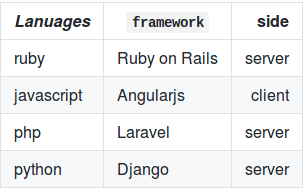
Table 1
| Entry | Item | |
|---|---|---|
| John Doe | 2016 | Description of the item in the list |
| Jane Doe | 2019 | Description of the item in the list |
| Doe Doe | 2022 | Description of the item in the list |
Table 2
| Header1 | Header2 | Header3 |
|---|---|---|
| cell1 | cell2 | cell3 |
| cell4 | cell5 | cell6 |
| cell1 | cell2 | cell3 |
| cell4 | cell5 | cell6 |
| Foot1 | Foot2 | Foot3 |
Blockquotes
> Blockquotes are very helpful.
> This line is part of the same quote.

New line

> Another **line**.
Blockquotes are very helpful. This line is part of the same quote.
New line
Another line.
Buttons
Make any link standout more when applying the .btn class.
Notices
Watch out! You can also add notices by appending {: .notice} to a paragraph.
HTML Tags
Address Tag
1 Infinite LoopCupertino, CA 95014
United States
Anchor Tag (aka. Link)
This is an example of a link.
Abbreviation Tag
The abbreviation CSS stands for “Cascading Style Sheets”.
Cite Tag
“Code is poetry.” —Automattic
Code Tag
You will learn later on in these tests that word-wrap: break-word; will be your best friend.
Strike Tag
This tag will let you strikeout text.
Emphasize Tag
The emphasize tag should italicize text.
Insert Tag
This tag should denote inserted text.
Keyboard Tag
This scarcely known tag emulates keyboard text, which is usually styled like the <code> tag.
Preformatted Tag
This tag styles large blocks of code.
.post-title {
  margin: 0 0 5px;
  font-weight: bold;
  font-size: 38px;
  line-height: 1.2;
  and here's a line of some really, really, really, really long text, just to see how the PRE tag handles it and to find out how it overflows;
}
Quote Tag
Developers, developers, developers…
–Steve Ballmer
Strong Tag
This tag shows bold text.
Subscript Tag
Getting our science styling on with H2O, which should push the “2” down.
Superscript Tag
Still sticking with science and Isaac Newton’s E = MC2, which should lift the 2 up.
Variable Tag
This allows you to denote variables.
Conclusion
In this page, I can’t show all the benefits of markdown because jekyll doesn’t support some syntaxes like tables (i had to use an image to show the result) or headers.
Check the doc for more information.